How Does Adit's Schedule Integrate with CrystalPM
What information does Adit read from my Schedule in CrystalPM?
Booked Appointments
Blockouts
[More Information Coming Soon]
Employee Hours on an Ongoing Schedule (Provider Business Hours)
In CrystalPM, you can configure an "ongoing" employee schedule which allows you to create a set schedule for the provider on a weekly basis.
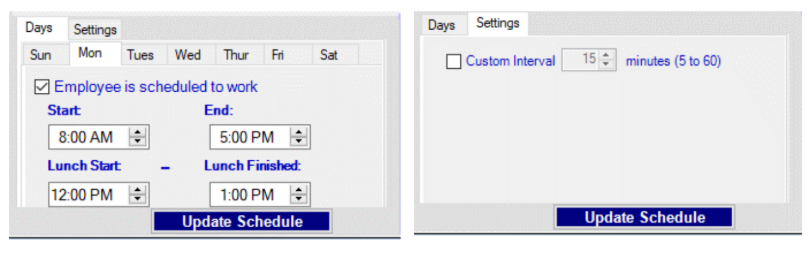
 In Adit we consider this as “Provider Hours”. This will only be considered if online scheduling is enabled and you have selected "Provider Hours" in your availability formula.
To learn how to set up an ongoing employee schedule in CrystalPM, Click Here.
Employee Hours For One Day (Provider Custom Hours)
In CrystalPM, you can also configure an employee schedule to be applied on a day-to-day basis. This will be more tedious but allows for a customized schedule.
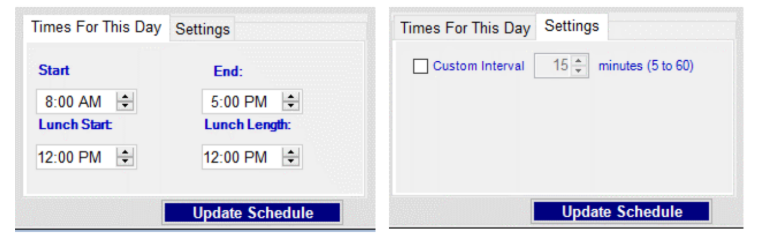
In Adit we consider this as “Provider Hours”. This will only be considered if online scheduling is enabled and you have selected "Provider Hours" in your availability formula.
To learn how to set up Single Day Employee Hours in CrystalPM, Click Here.
Schedule Templates (Availabilities)
Schedule Templates are blocks of time when a doctor is available for patients book appointments. Appointment slots allow advanced customization and can let Providers set what type of appointments they want to accept during those timeframes. For example, if a Provider wants to focus on New Patient Exams in the morning, they can set their schedule template to only accept “New Patient” appointments.
In Adit, we consider "Schedule Templates" as "Availabilities".
Schedule Templates will only be considered in Online Scheduling if it is enabled in your availability formula.
What information writes back to my management system?
This chart illustrates what information can be managed directly within Adit's Schedule
Create | Edit | Delete | Write Back into CrystalPM | |
| Appointments | ✅ | ✅ | ✅ | ✅ |
| Blockouts | ✅ | ✅ | ✅ | ✅ |
| Availabilities (Schedule Templates) | ✅ | ✅ | ✅ | ✅ |
Related Articles
Understanding Adit’s New Navigation Layout
Adit’s latest update introduces a redesigned interface that improves navigation, multitasking, and access to key features. This article explains the new UI/UX elements, their purpose, and how you can use them effectively. 1. New Menu Structure (Left ...How Does Adit's Schedule Integrate with OfficeMate
What information does Adit read from my Schedule in OfficeMate? Booked Appointments To Learn how to create appointments in Officemate, Click Here. Office Business Hours In OfficeMate, you can configure your office’s business hours. To learn how to ...How does Adit's Schedule Integrate with OpenDental
What information does Adit read from my Schedule in OpenDental? Booked Appointments Block Outs (Lunch, Holidays, etc) Opendental has an option to allow appointments to be created over blockouts. If you have this feature on, then Adit will also match ...How Does Adit's Schedule Integrate with RevolutionEHR
What information does Adit read from my Schedule in RevolutionEHR? Booked Appointments Blockouts (Busy Time, Office Closures) "Busy time" is used to block out a time in an employee’s schedule. Note: If a provider has an appointment slot set up, busy ...Understanding the Schedule on Your Home Page
The new Scheduler on your Home Page gives you a real-time, integrated view of your practice’s appointments. You can create, view, and manage your appointments and blockouts all within Adit. Feature Overview 1. Today Button Function: Quickly jump back ...