AI front desk call handling summary
This article explains the Front Desk Call Handling Insights available in your AI Agent dashboard. These insights help you understand how calls are handled, how many appointments are booked, and where opportunities exist to improve patient experience and operational efficiency.
Use this guide to confidently interpret each metric and take action based on what you see.
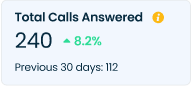
Total Calls Answered
What it means
The total number of inbound calls successfully answered by the AI Agent during the selected time period. A comparison with the previous 30 days shows performance trends.
Why it matters
Confirms that patient calls are being answered consistently
Measures overall call coverage
Helps ensure no calls are missed when staff is unavailable
After Hours Calls
What it means
Calls handled by the AI Agent outside normal business hours, including evenings, weekends, and holidays.
Why it matters
Captures patient intent when your office is closed
Extends availability without additional staffing
Prevents missed booking opportunities
AI Minutes Spoken
What it means
The total voice minutes the AI Agent was actively on calls during the selected period, and the average call duration.
Why it matters
Shows how much live call time the AI Agent is handling
Average per call flags unusually long or short interactions
Helps size AI call volume and usage over the period
Scheduling Calls
What it means
The number of calls where the caller’s intent was to schedule an appointment, regardless of whether a booking was completed.
Why it matters
Shows patient demand for appointments
Helps track scheduling-related call trends
Provides context for booking performance
Appointments Booked
What it means
Appointments fully booked by the AI Agent without staff involvement.
Why it matters
Directly reflects revenue impact
Demonstrates automation success
Measures patient conversion effectiveness
Booking Via Text
The total number of appointments booked through the text channel during the selected period, split into calls recovered by the SMS Agent and patient-initiated inbound bookings.
What it means
The total appointments booked via text during the selected period. “Recovered” counts bookings the SMS Agent won back from missed calls and incomplete flows; “Inbound” counts bookings that patients started by texting in.
Why it matters
- Shows how much booking volume the text channel is driving
- Separates recovered appointments from net-new inbound demand
- Quantifies appointments that might otherwise have been lost
Incomplete → Booked
What it means
Counts patients who started a booking but didn’t finish, then completed it after an SMS follow-up. The Recovery % is the share of incomplete bookings won back.
Why it matters
- Recaptures appointments patients nearly abandoned
- Measures how effectively the SMS Agent closes drop-offs
- Turns partial interest into confirmed visits
Missed Call → Booked
The number of missed calls that were followed up by the SMS Agent and converted into confirmed appointments, along with the recovery rate.
What it means
Counts callers who didn’t reach the practice and were then booked after an SMS follow-up. The Recovery % is the share of missed calls converted into appointments.
Why it matters
- Rescues revenue from calls staff couldn’t answer
- Ensures a missed call doesn’t become a missed patient
- Measures the SMS Agent’s call-recovery effectiveness
Reply Rate
What it means
The share of SMS conversations in which the patient responded to the Agent. A comparison with the previous 30 days shows engagement trends.
Why it matters
- Indicates how well messages are landing with patients
- Signals message quality, timing, and relevance
- A drop can flag deliverability or content issues to review
Text Sent
What it means
The total outbound texts the SMS Agent sent, and the number of distinct conversations those texts spanned.
Why it matters
- Shows overall messaging activity and reach
- Provides context for the Reply Rate and booking metrics
- Helps gauge SMS Agent workload and coverage
Scheduling Calls Breakdown
What it means
This insight shows how effectively the AI Agent handled appointment scheduling calls, split between new patients and existing patients, and how many of those calls resulted in successfully booked appointments. It helps you understand both call volume and conversion performance at a glance.
What This Shows:
Total Scheduling Calls: All incoming calls where the AI Agent attempted to schedule an appointment.
New Patient Scheduling Calls: Calls from patients who are booking with your practice for the first time.
New Patient Appointments Booked: The percentage of new patient calls that successfully resulted in a booked appointment.
Existing Patient Scheduling Calls: Calls from returning patients scheduling follow-up or additional visits.
Existing Patient Appointments Booked: The percentage of existing patient calls that successfully resulted in a booked appointment.
Why It’s Useful:
Measure how well the AI Agent converts inbound interest into booked appointments.
Understand performance differences between new and existing patients.
Identify opportunities to improve scripts, availability, or workflows if booking rates are lower than expected.
Track the impact of changes like updated scheduling rules or expanded availability.
Example:
If you notice high scheduling call volume but lower booking rates for new patients, it may indicate missing appointment availability, insurance questions, or qualification steps that need refinement. Improving these areas can directly increase new patient acquisition without additional marketing spend.
Scheduling, Rescheduling & Confirmation – Call Handling Breakdown
This insight shows how effectively the AI Agent handled scheduling, rescheduling, and appointment confirmation calls, including which calls were completed end-to-end and which required human follow-up or transfer. It helps you quickly assess the AI Agent’s call resolution performance and overall reliability. The Call Handling Breakdown insight analyzes how the AI Agent managed appointment-related calls from start to finish. Each call is categorized based on whether the AI Agent fully resolved the request or whether additional staff involvement was needed.
What This Shows:
Total Calls Answered by Agent: All scheduling, rescheduling, and confirmation calls answered by the AI Agent.
Completely Handled by Agent: Calls where the AI Agent successfully completed the task without any staff intervention.
Partially Handled & Transferred: Calls where the AI Agent gathered information but transferred the call to your front desk or on-call staff to complete the request.
Partially Handled & Follow-Up Created: Calls where the AI Agent captured intent and details, then created a follow-up task for staff to complete later.
Incomplete Calls: Calls that ended before the task could be completed (e.g., caller hang-ups or technical interruptions).
Why It’s Useful:
Measure how autonomously the AI Agent handles appointment-related calls.
Identify when and why calls still require human intervention.
Reduce front-desk workload by increasing the percentage of fully handled calls.
Monitor incomplete calls to spot issues with call flow, scripting, or caller experience.
Example:
If you see an increase in partially handled or incomplete calls, it may indicate complex appointment rules, limited availability, or unclear caller prompts. Refining workflows or expanding AI Agent permissions can improve full call resolution and reduce staff follow-ups.
Daily Calls by Call Outcome
What it means
This insight shows how many calls the AI Agent handled each day, categorized by the final outcome of the call.
Call outcomes include
Why it matters
How to use this insight
Daily Calls Handled by Handling Status
This insight shows how many calls the AI Agent handled each day, categorized by handling status such as fully handled, transferred, follow-up created, or incomplete. It helps you understand daily trends in how effectively calls are being resolved. The Daily Calls Handled by Handling Status insight analyzes all calls answered by the AI Agent and classifies each call based on how it was handled and resolved.
What This Shows:
Handled: Calls that were fully completed by the AI Agent without any staff involvement.
Follow-Up Created: Calls where the AI Agent captured the request and created a follow-up task for staff.
Transferred: Calls that were partially handled and then transferred to front-desk or on-call staff.
Incomplete: Calls that ended before the request could be completed (e.g., hang-ups or disconnections).
Why It’s Useful:
Monitor how efficiently the AI Agent resolves calls on a daily basis.
Identify spikes in transfers or follow-ups that may indicate workflow gaps.
Reduce front-desk workload by increasing fully handled calls.
Improve caller experience by minimizing incomplete interactions.
Example:
If you notice a rise in transferred or incomplete calls on certain days, it may indicate high call complexity, limited availability, or unclear prompts. Adjusting AI Agent workflows or permissions can help improve full call resolution rates.
Hourly Calls Handled by Handling Status
What This Shows:
Hourly Call Volume: Number of calls handled during each hour.
Handled: Calls fully completed by the AI Agent without staff involvement.
Follow-Up Created: Calls where the AI Agent captured details and created a follow-up task for staff.
Transferred: Calls partially handled and transferred to front-desk or on-call staff.
Incomplete: Calls that ended before resolution.
Why It’s Useful:
Identify peak calling hours across the day.
Understand when the AI Agent resolves most calls independently.
Spot hours with higher transfers or incomplete calls.
Optimize AI Agent behavior, permissions, or staffing coverage by time of day.
If incomplete or transferred calls spike during early mornings or late evenings, it may indicate limited availability, complex requests, or call flows that need refinement for those hours.
Daily Calls Handled by Call Type
This insight shows how many calls the AI Agent handled each day, broken down by call type such as scheduling, rescheduling, billing, insurance, and more. It helps you understand daily call volume patterns and identify which types of requests are most frequent.
The Daily Calls Handled by Call Type insight analyzes inbound calls handled by the AI Agent over time and categorizes them by the caller’s intent. This view allows you to track daily trends and shifts in call demand across different call types.
What This Shows:
Call Volume by Day: The total number of calls handled by the AI Agent each day.
Call Type Breakdown: Distribution of calls across categories such as:Scheduling
Rescheduling
Confirmations
Billing
Insurance
Emergency
Complaints
Other requests
Filters: Ability to view data by call direction (incoming, outgoing, missed) and by day or time range.
Why It’s Useful:
Identify peak days and recurring patterns in patient call behavior.
Understand which call types drive the most volume on specific days.
Optimize staffing and AI Agent configurations around high-demand periods.
Track how changes (holidays, promotions, policy updates) affect call volume.
Example:
If you notice a spike in scheduling and rescheduling calls early in the week, you can ensure the AI Agent has sufficient appointment availability and optimized scripts during those days to maximize booking success and reduce follow-ups.
New Patient Not Booked Reasons
This insight highlights the top reasons new patients did not book an appointment during scheduling calls handled by the AI Agent. It helps identify early friction points that impact new patient acquisition. this insight analyzes scheduling calls from new patients where an appointment was not successfully booked. Each reason reflects a specific constraint or decision point identified during the call.
What This Shows:
Insurance Not Accepted: The patient’s insurance is not supported by the practice.
Preferred Date Not Available: Requested appointment date or time was unavailable.
Preferred Service Not Available: Requested treatment or service could not be scheduled.
Preferred Location Not Available: Desired clinic location was unavailable.
Preferred Provider Not Available: Requested dentist or specialist was unavailable.
Availability Inquiry Call: Patient was only checking availability, not ready to book.
Price Inquiry Call: Patient requested pricing information without booking.
Preferred Financing Not Available: Requested payment or financing option was unavailable.
Cash Not Accepted: Cash payment was not supported.
Other: Miscellaneous or uncategorized reasons.
Why It’s Useful:
Pinpoint why new patient leads are not converting.
Identify operational gaps affecting first-time callers.
Improve AI Agent responses by offering alternatives (dates, providers, locations).
Increase new patient bookings without increasing marketing spend.
Example:
If “Preferred Date Not Available” is the top reason, offering nearby dates or waitlist options during the call can significantly improve new patient conversion
Existing Patient Not Booked Reasons
This insight shows the reasons existing patients did not book an appointment during scheduling calls handled by the AI Agent. It helps uncover operational or preference-based blockers affecting return visits and continuity of care. This insight analyzes scheduling calls from existing patients where no appointment was booked. These reasons often reflect preferences or scheduling constraints rather than lead qualification issues.
What This Shows:
Insurance Not Accepted: Insurance on file is no longer supported.
Preferred Date Not Available: Requested follow-up date or time was unavailable.
Preferred Service Not Available: Requested treatment could not be scheduled.
Preferred Location Not Available: Preferred clinic location was unavailable.
Preferred Provider Not Available: Desired provider was unavailable.
Availability Inquiry Call: Patient checked availability but did not book.
Price Inquiry Call: Patient requested cost information only.
Preferred Financing Not Available: Requested payment option was unavailable.
Cash Not Accepted: Cash payment was not supported.
Other: Miscellaneous reasons.
Why It’s Useful:
Understand barriers affecting repeat visits.
Identify scheduling or provider availability issues impacting patient retention.
Reduce churn by improving flexibility for loyal patients.
Optimize AI Agent workflows for follow-up care and recall appointments.
Example:
If existing patients frequently don’t book due to provider availability, adjusting provider schedules or offering alternate providers can help retain patients and avoid lost follow-ups.
Outcome by Type and Channel
A breakdown of call outcomes across each call type and channel, showing how calls in each category resolved — Booked, Not Booked, Cancelled, Resolved, or Not Resolved. Use the filters to narrow by type or channel.
What it means
A stacked view of how calls in each category (Scheduling, Rescheduling, Emergency, Others, Billing, Incomplete, Confirmations, Insurance, Unanswered) resolved. Each bar is segmented by outcome — Booked, Not Booked, Cancelled, Resolved, and Not Resolved — with filters to focus on a specific type or channel.
Why it matters
- Shows where the AI Agent is converting calls versus falling short
- Reveals the outcome mix for each call type at a glance
- Pinpoints categories that need attention (e.g. high Not Booked or Not Resolved)
Where to Find This Report
Navigate to:
AI Agent → Insights → Front Desk Call Handling Summary
Related Articles
AI Front desk task Management Summary
Overview This article explains the Task Management Insights available in your AI Agent dashboard. These insights help you understand how tasks are created, managed, and completed by your team, and where operational gaps may exist. Use this guide to ...Call Forwarding from previous provider to Adit
To ensure you continue receiving incoming calls while your phone numbers are being ported to Adit Voice, you can temporarily forward your existing office phone number(s) to the Adit temporary routing number provided by your Onboarding manager. This ...AI Agent Call Flow Setup Guide
Overview The AI Agent can be configured for practices using either: Adit Phones A Third-Party Phone Provider The setup process differs depending on the phone system being used. This guide explains the requirements, call flows, and warm transfer ...CRM – Patients
The Patients record type contains all patient records associated with your practice. Patient records can originate from either: Your EHR/PMS Adit Any patient record created in Adit is automatically synced to your EHR/PMS, and any patient record ...CRM – Leads
Leads are prospective patients who have shown interest in your practice but have not yet booked an appointment. Unlike Patients, Lead records exist only within Adit and are not synced to your EHR/PMS. When a Lead books an appointment and becomes a ...