AI Coaching Summary Overview
The AI Coaching Summary page gives a concise view of call quality, coaching opportunities, and follow-up activity. Use this page to spot trends, prioritize coaching topics, measure follow-through on call tasks, and understand how call-handling quality affects patient experience and scheduling outcomes.
Overall Average Score
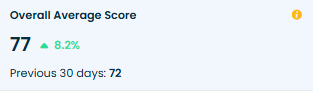
What it means: The average score of all scored calls in the selected period. Each call is evaluated on the scorecard parameters and contributes to this overall average.
Why it matters: This single metric provides an at-a-glance measure of call-handling quality across the practice or for an individual user.
How practices use it: Track quality improvements, compare teams/locations, and validate coaching effectiveness.
Example: Scores of 81, 74, 79, 72 → Overall Average Score = 76.5.
Scored Conversations
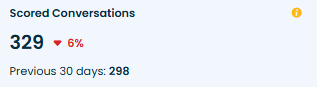
What it means: Total number of calls analyzed and scored by the AI within the selected date range.
Why it matters: Indicates the sample size used to evaluate performance — larger counts give more reliable trends.
How practices use it: Ensure enough calls are scored to draw meaningful conclusions about performance.
Example: If the AI scored 329 calls this month, the metric shows 329.
Call Tasks Created
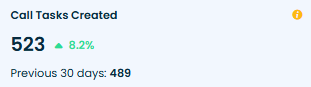
What it means: Number of automated follow-up tasks generated from call outcomes (missed callbacks, scheduling follow-ups, billing actions, etc.).
Why it matters: Tasks help prevent missed opportunities and ensure consistent follow-up workflows.
How practices use it: Monitor workload, identify spikes in follow-ups, and confirm patient needs are addressed.
Example: AI created 523 follow-up tasks this period → shows 523.
Call Tasks Completed
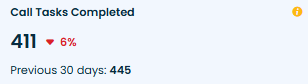
What it means: Number of automated call tasks that staff completed during the selected period.
Why it matters: Reflects responsiveness and operational follow-through; higher completions usually mean better patient outcomes.
How practices use it: Measure task execution, identify staffing or process gaps, and follow up on overdue items.
Example: If 411 tasks were completed out of tasks created, this KPI will display 411.
Call Task Completion
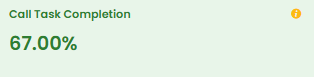
What it means: Percentage of created call tasks that were completed in the selected timeframe.
Why it matters: Indicates how reliably the practice follows through on AI-identified actions.
How practices use it: Establish SLAs (e.g., 80%+), monitor trends, and hold teams accountable for follow-ups.
Example: 411 completed out of 523 created → Call Task Completion = 78.68%.
Score Trend
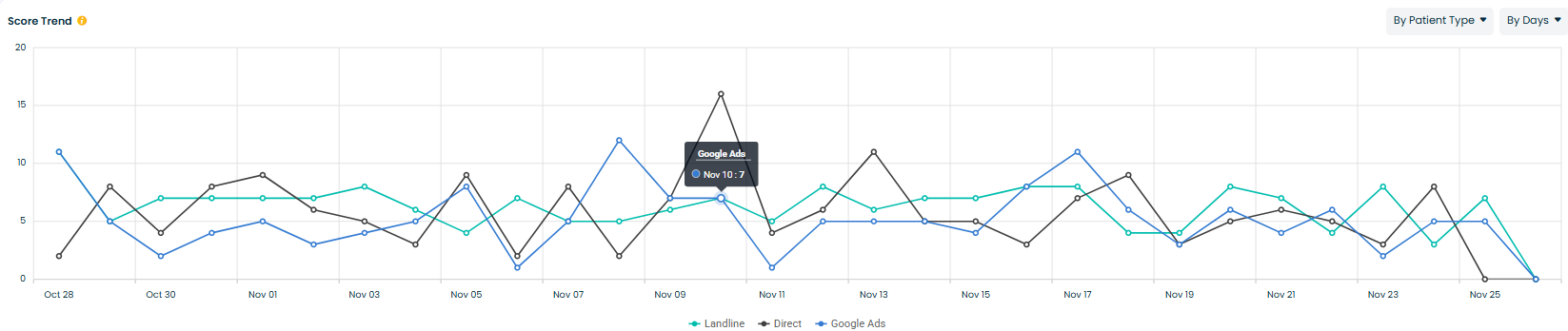
What it means: A trend chart that displays score changes over time, filterable by user, call type, source, patient type, and outcome.
Why it matters: Trends reveal when and why quality shifts occur, enabling targeted interventions before problems escalate.
How practices use it: Diagnose dips in quality, assess the impact of coaching, and align resources to high-impact times or call types.
Example: If “Google Ads” calls score consistently lower than “Direct” calls, modify scripts for ad-generated leads.
Average Score by Call Type
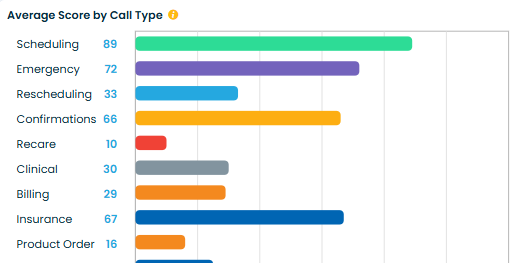
What it means: Average call score segmented by call type (Scheduling, Emergency, Billing, Insurance, Clinical, Recare, etc.).
Why it matters: Different call types require different skills; this metric highlights strengths and gaps by category.
How practices use it: Target training to low-scoring call types and reinforce strengths in high-scoring areas.
Example: Scheduling = 89, Billing = 29 → prioritize billing call coaching.
Unhappy Customers by Patient Type
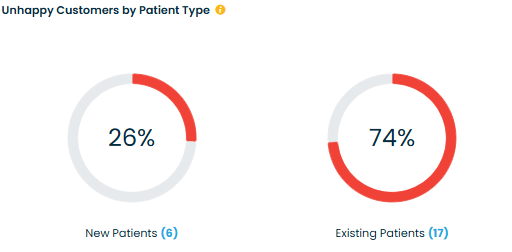
What it means: Percentage (and count) of calls with negative sentiment, split between New and Existing patients.
Why it matters: Reveals which patient segments are experiencing frustration — helps pinpoint onboarding vs retention issues.
How practices use it: Focus improvements on the affected group (e.g., better new-patient scripts or resolving return-patient friction).
Example: If Existing Patients show 74% of unhappy calls, investigate operational issues affecting returning patients.
Unhappy Customers by Call Type
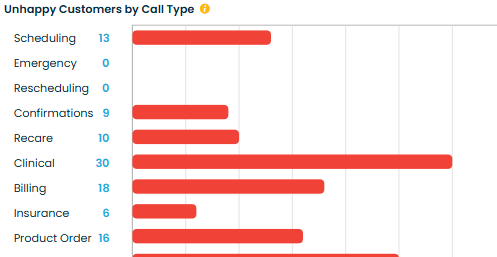
What it means: Number of negative-sentiment calls categorized by call type (Billing, Clinical, Scheduling, etc.).
Why it matters: Identifies friction points by conversation category so you can address the root causes.
How practices use it: Prioritize coaching and script updates for the highest-friction call types.
Example: Billing has 18 unhappy calls — focus training and process fixes on billing conversations.
Scorecard Breakdown
What it means: Frequency of positive (Yes) vs negative (No) results across the 15 scorecard parameters (e.g., Introduction, Rapport, Active Listening, Empathy, Knowledge, Objection Handling, Process Adherence, Closing).
Why it matters: The most actionable part of coaching — it tells you exactly which behaviors require improvement.
How practices use it: Create targeted coaching sessions, measure improvement on specific skills, and use parameter-level scores in 1:1s.
Example: Introduction = 94% Yes; Active Listening = 70% Yes → coach on deeper engagement techniques.
Best Practices for Using AI Coaching Summary
- Review Score Trend weekly to detect early shifts in quality.
- Use Average Score by Call Type to prioritize training content.
- Compare Unhappy Customers by Patient Type to identify onboarding or retention issues.
- Track Call Task Completion and set SLAs to ensure operational follow-through.
- Leverage Scorecard Breakdown for focused 1:1 coaching and behavioral targets.
Related Articles
AI Coaching - Adit Call Intelligence
Overview AI Coaching in Adit Call Intelligence provides a complete view of how your front desk is performing on patient calls. It analyzes scored conversations, tracks coaching opportunities, highlights unhappy customer trends, and shows how ...Summary Dashboard Overview - Adit Call Intelligence
Overview The Summary Dashboard gives your practice a real-time view of front desk performance. It brings together key call intelligence metrics like new patient conversions, caller sentiment, call categories, and booking efficiency — all in one ...Calls overview - Adit Call Intelligence
Overview The Calls section is the central log of every phone interaction your practice has – answered calls, outbound calls, missed calls, and voicemails. From here you can filter call activity, review AI call analysis, and track how well your team ...AI Intelligence - Call Tasks Summary
The Task Handling module provides a complete overview of all automated tasks generated from call activity. These tasks help ensure timely follow-ups with patients, reduce missed opportunities, and maintain strong operational performance. This ...AI Intelligence Overview - Adit Call Intelligence
AI Intelligence provides a complete, data-driven view of your practice’s performance across calls, opportunities, call handling, task management, and location-level metrics. This article gives a high-level overview of each dashboard before you ...